How to Use Meta AI on WhatsApp for Questions, Images & More

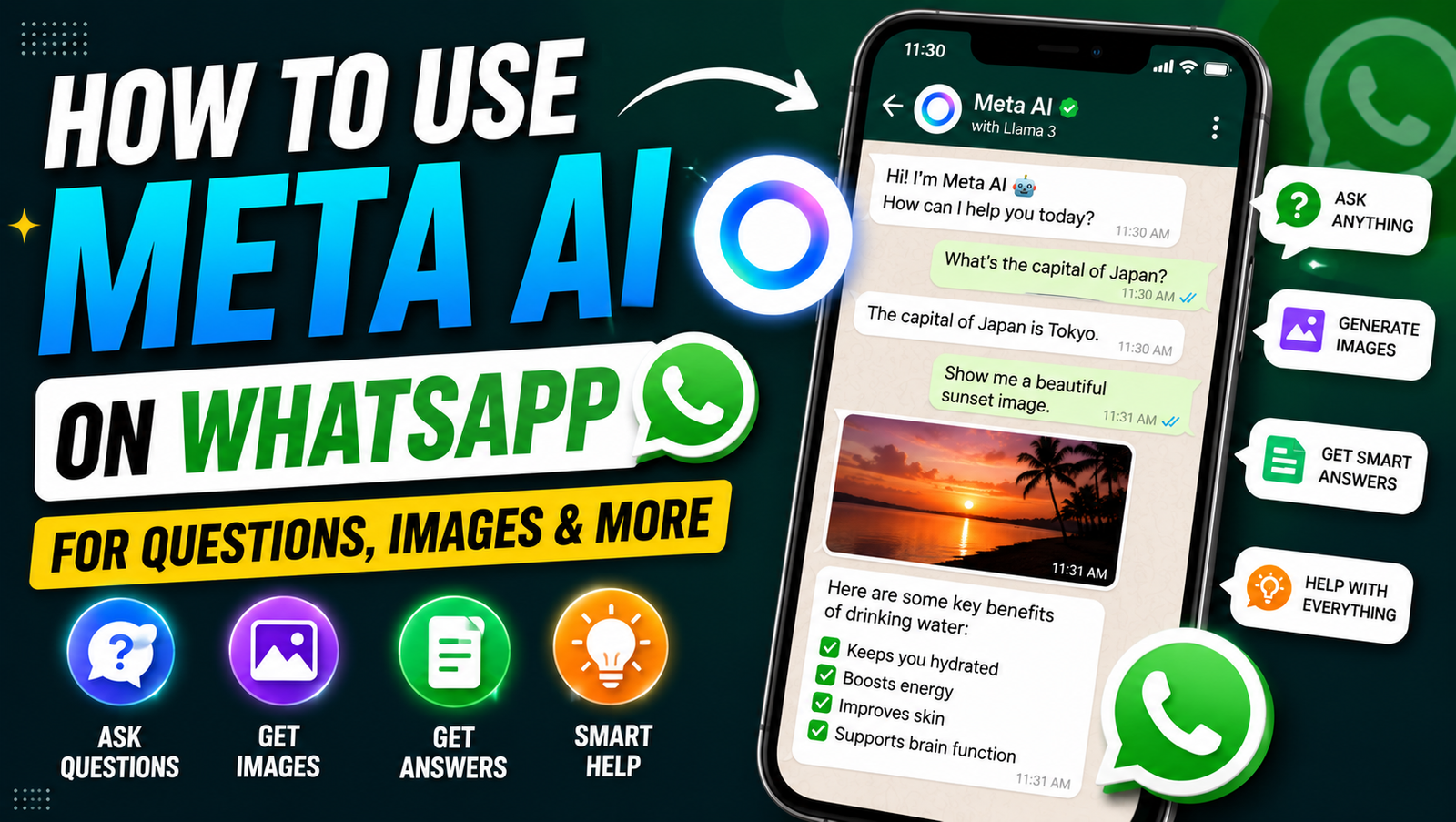
Meta AI on WhatsApp brings a Meta AI chatbot directly into the messaging app, working as an AI assistant in WhatsApp for questions, ideas, writing help, and everyday tasks. This WhatsApp AI assistant is part of Meta artificial intelligence and its growing use of generative AI on WhatsApp, giving users a convenient built-in AI tool without needing to leave their WhatsApp conversations.
Depending on your region and account, you may find the Meta AI icon or Meta AI tab in WhatsApp. You can use this AI chatbot as a smart assistant for quick answers, brainstorming, and other AI experiences, while supported chats can also provide AI help in chats. However, Meta AI availability and specific Meta AI on WhatsApp AI features may vary by country and account.
Table of Contents
Meta AI on WhatsApp Chats and Groups
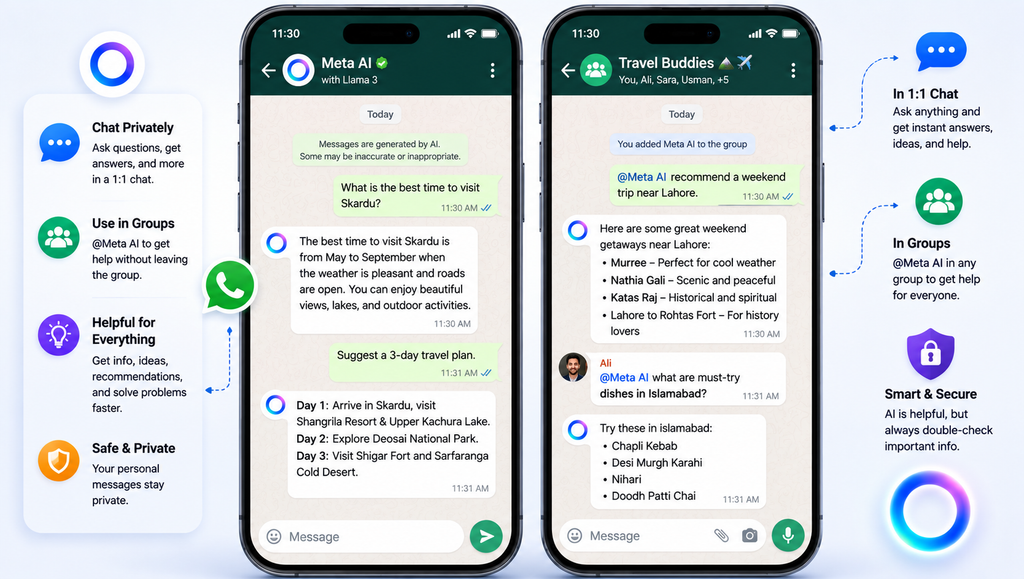
You can ask Meta AI in a conversation or use it for one-on-one chat whenever you need quick instant answers, ideas, or chat assistance. In supported WhatsApp group chats, simply tag Meta AI in WhatsApp by typing @MetaAI followed by your question or request. You can mention Meta AI to get help with planning with Meta AI, recommendations, brainstorming ideas, travel planning, restaurant suggestions, or other everyday questions without leaving the conversation.
For example, you can use Meta AI in a group chat to suggest dinner options, settle a friendly debate, plan a group trip, or generate ideas for an upcoming event. Meta AI can provide AI suggestions and group chat assistance when directly invoked, while its responses can be shared within the group conversation. Meta also says that in group chats, Meta AI only processes messages that invoke @Meta AI or replies that invoke it, rather than reading the entire conversation.
Meta AI Prompts and Questions
- Meta AI on WhatsApp prompts: Write clear requests in everyday language instead of using complicated commands. Use Meta AI on WhatsApp is designed to understand conversational requests and provide useful responses.
- WhatsApp AI prompts: Use prompts for tasks such as asking for information, getting quick answers, explaining concepts, or generating creative ideas.
- Ask questions with Meta AI: Start with a direct question, such as “What are the best places to visit in Karachi?” or “Explain photosynthesis in simple words.”
- Natural language prompts: Talk to Meta AI naturally, just as you would communicate with another person. Meta says its assistant is designed for more seamless and natural interactions.
- AI instructions: Add specific details to tell Meta AI exactly what you want, including the desired length, tone, audience, or format.
- Prompt examples: “Explain this topic for a beginner,” “Give me five business ideas,” or “Create a weekend travel plan.”
- Follow-up questions: Continue the Meta AI chat with additional questions to refine an answer or request more detail.
- Conversational AI: Treat the interaction as an ongoing conversation rather than sending a single isolated command.
- Research assistance: Ask Meta AI to help understand a subject, compare options, or organize information. Meta says its newer AI capabilities can support deeper research tasks in supported experiences.
- Idea generation: Use simple prompts for quick brainstorming or detailed prompts when you need more structured and specific results.
- Personalized suggestions: When supported, provide relevant preferences or context to receive recommendations better suited to your needs.
Visit this: Generative AI Model Update 2026: Latest Updates, Capabilities & Tools
Writing and Message Assistance
Meta AI can also work as an AI writing assistant when you need help communicating on WhatsApp. You can write with Meta AI on WhatsApp to draft WhatsApp messages, create a friendly message, prepare a professional message, or write a polite reply. WhatsApp has also introduced AI Writing Help features that can suggest responses based on your conversation.
You can use AI message writing for a birthday message, creative message, or WhatsApp captions, while asking Meta AI to rewrite messages, proofread messages, fix grammar, improve wording, or change message tone. For example, you could ask it to make a message warmer, shorter, more professional, or more casual. This makes message drafting faster when you know what you want to say but need help expressing it clearly.
AI Image Generation on WhatsApp
With Meta AI image generation, you can create AI images directly through supported WhatsApp experiences by describing what you want in natural language. Meta’s current image-generation technology can turn image prompts into AI-generated images and other generative AI images, making it possible to generate visuals without using a separate text-to-image AI tool. Meta says its newer image technology also supports more detailed prompts and creative editing.
To create pictures in WhatsApp, start a Meta AI chat and describe the image you want, such as a birthday card design, travel scene, custom images, or other creative visuals. A good image generation prompt should clearly describe an image, including its subject, style, setting, and important details. Depending on availability, you can use the results for WhatsApp Status images, group chat images, or an AI-generated profile picture.
Meta AI on WhatsApp Benefits
| Benefits | How It Helps in Meta AI on WhatsApp |
|---|---|
| Instant AI assistance | Get quick help, answers, ideas, and recommendations directly inside supported WhatsApp experiences. |
| Convenient AI tool | Use AI without opening a separate chatbot or switching between multiple apps. |
| AI without leaving WhatsApp | Ask questions, create content, and get assistance while staying in your chats. Meta specifically highlights using Meta AI across chats and search without leaving the app. |
| Seamless AI experience | Conversational interactions make it easier to ask questions naturally and continue with follow-up requests. |
| Faster communication | Get help drafting messages and suggested responses, which can make everyday replies quicker. |
| Smarter messaging | AI features can help improve how you communicate, including message suggestions and creative chat features. |
| Improved productivity | Use Meta AI for research, planning, brainstorming, and other tasks that can reduce repetitive work. |
| Quick responses | Ask everyday questions and receive AI-generated answers without leaving your WhatsApp environment. |
| Easy content creation | Generate ideas, images, and other content through supported Meta AI features. |
| Creative assistance | Get help with visual ideas, writing, image creation, and creative projects. |
| Everyday AI help | Use Meta AI for practical questions, recommendations, planning, and learning. |
| Personalized assistance | In supported experiences, Meta AI can use certain details you share to make future responses more relevant. |
| Efficient conversations | Access AI help within individual or group conversations instead of moving information between apps. |
| AI-powered productivity | Combine AI assistance with writing, research, planning, and content-creation tasks to work more efficiently. |
| Convenient messaging experience | Keep communication and AI assistance together, making WhatsApp a more useful everyday tool. |
Note: Meta AI on WhatsApp features and availability can vary by country, device, account, and rollout stage.
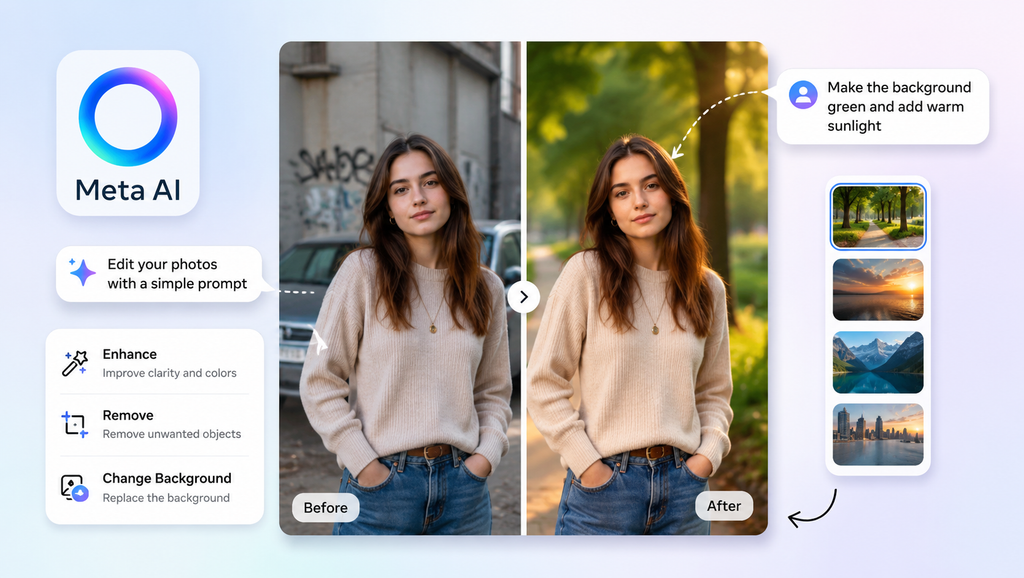
Photo Editing With Meta AI on WhatsApp
- Edit photos with Meta AI on WhatsApp: WhatsApp now supports Meta AI-powered photo touch-ups in supported regions, allowing you to make changes directly before sending a picture in a chat.
- AI photo editing: Use simple instructions to make creative or practical changes without opening a separate editing app.
- Remove photo background: Ask Meta AI to clean up or remove distracting elements from the background of a photo. Meta also demonstrates background cleanup and image editing with its newer image technology.
- Change background: Replace the existing background with a new scene or setting when the feature is available.
- Remove objects: Use AI to remove unwanted people, objects, or distractions from an image.
- Add objects: Describe what you want to add, then let Meta AI create or place the requested element in the image.
- Change lighting: Ask for adjustments that make a photo look brighter, softer, warmer, or more balanced.
- Brighten photos: Use a simple prompt such as “Make this photo brighter and clearer” when supported.
- Photo enhancement: Improve the overall appearance of a picture with AI-assisted touch-ups before sharing it.
- AI image editing: Meta AI can understand conversational editing instructions, allowing you to refine an image through multiple requests.
- Edit images in chat: WhatsApp’s newer AI photo tools are designed to let you touch up photos directly within a chat.
Note: Meta says AI photo features may not be available to everyone yet and are being rolled out gradually.
Learning, Research and Everyday Help
Meta AI on WhatsApp can be useful as an AI learning tool when you want to learn with Meta AI, ask Meta AI questions, or explain concepts in simpler language. You can ask for homework help, work through math problems, or request instant explanations with examples and step-by-step guidance. For research, Meta AI can act as a basic research assistant, helping you explore topics and organize ideas directly in WhatsApp.
You can also use Meta AI for travel research, dinner ideas, recommendations, brainstorming, and general information search. In supported experiences, it can help you understand images, identify objects in photos, and perform basic image analysis by answering questions about visual content. These features make Meta AI feel like a personal AI assistant for learning, planning, and everyday tasks without leaving WhatsApp.
Visit this: ChatGPT Tips and Tricks for Beginners: Complete Guide to Using AI Like a Pro
Meta AI for WhatsApp Business
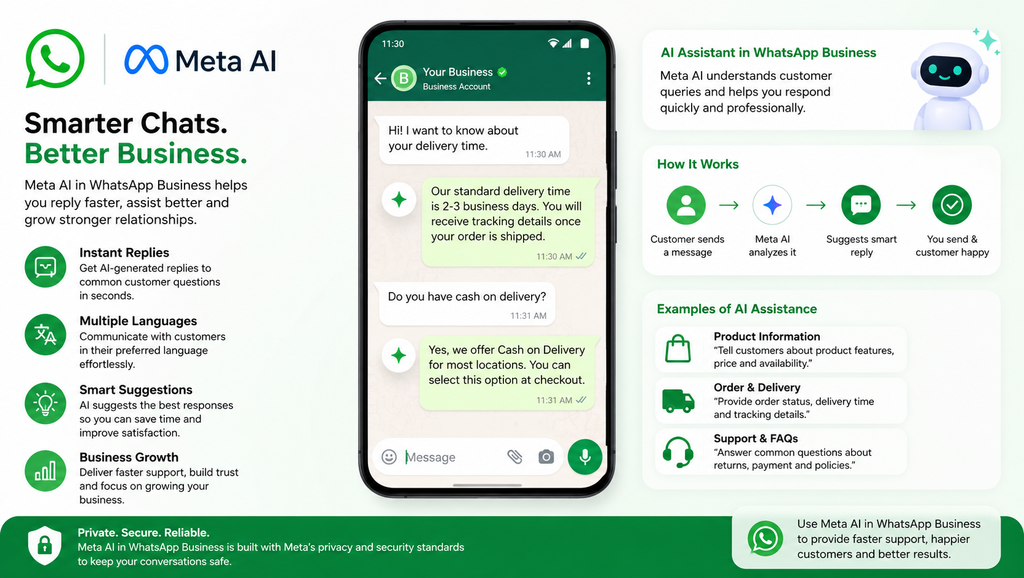
Meta AI for business is becoming increasingly useful for companies that rely on WhatsApp for business messaging and customer support. Meta has introduced Business AI tools that can answer routine customer questions, provide product information, recommend products, and help businesses respond to customers around the clock. This makes WhatsApp Business AI useful for handling common customer interactions without requiring a team member to answer every message manually.
Key uses include:
- Answering frequently asked customer questions
- Providing product, pricing, and shipping information
- Giving instant customer responses
- Recommending products based on customer needs
- Supporting multilingual customer conversations
- Handling routine customer interactions
- Helping businesses maintain consistent brand communication
- Allowing human staff to take over complex conversations
Multilingual and Translation Support
Meta AI provides multilingual AI capabilities, allowing users to interact with the assistant in several supported languages. Meta has expanded Meta AI languages across its apps, including WhatsApp, with support for languages such as English, Spanish, Hindi, French, German, Italian, Portuguese, and others depending on the market and rollout.
You can ask Meta AI to translate messages, translate WhatsApp messages, or craft responses in another language when the relevant language capability is available. For example, you could ask it to translate a message from English to Spanish or create a polite reply in Hindi. WhatsApp also has a separate built-in message translation feature that lets users translate messages directly in 1-to-1 chats, groups, and Channel updates, with language availability varying by platform.
Frequently Asked Question About Meta AI on WhatsApp
How do I use Meta AI on WhatsApp?
Open WhatsApp and look for the Meta AI icon or start a supported Meta AI chat. You can then type a question or request and chat with Meta AI just like a regular conversation.
How do I use Meta AI in a WhatsApp group chat?
In supported group chats, type @Meta AI followed by your question or request. Meta AI can then respond within the group conversation.
What can I ask Meta AI on WhatsApp?
You can ask Meta AI to explain topics, answer everyday questions, brainstorm ideas, help with planning, provide recommendations, assist with learning, and create or work with images where supported.
Is Meta AI available on WhatsApp for everyone?
No. Meta AI availability depends on factors such as your country, account, device, and feature rollout. If you cannot see the Meta AI icon or related features, they may not yet be available to you.
Is Meta AI on WhatsApp private?
WhatsApp says Meta AI does not access all messages in a group chat; it processes messages that directly invoke @Meta AI or replies that invoke it. WhatsApp also introduced Incognito Chat with Meta AI for private, temporary AI conversations in supported rollouts.
Privacy and Security
Meta AI privacy and WhatsApp privacy work differently depending on how you use the features. Your regular WhatsApp private messages and calls remain protected by end-to-end encryption, while Meta AI only receives messages that you directly send to or invoke with the AI.
For stronger Meta AI safety, WhatsApp now offers Incognito Meta AI chat, powered by Private Processing. These temporary conversations are processed in a secure environment that even Meta cannot access, and they disappear by default. This provides an additional option when you want AI chat privacy, stronger message protection, and greater personal message privacy while using AI.