
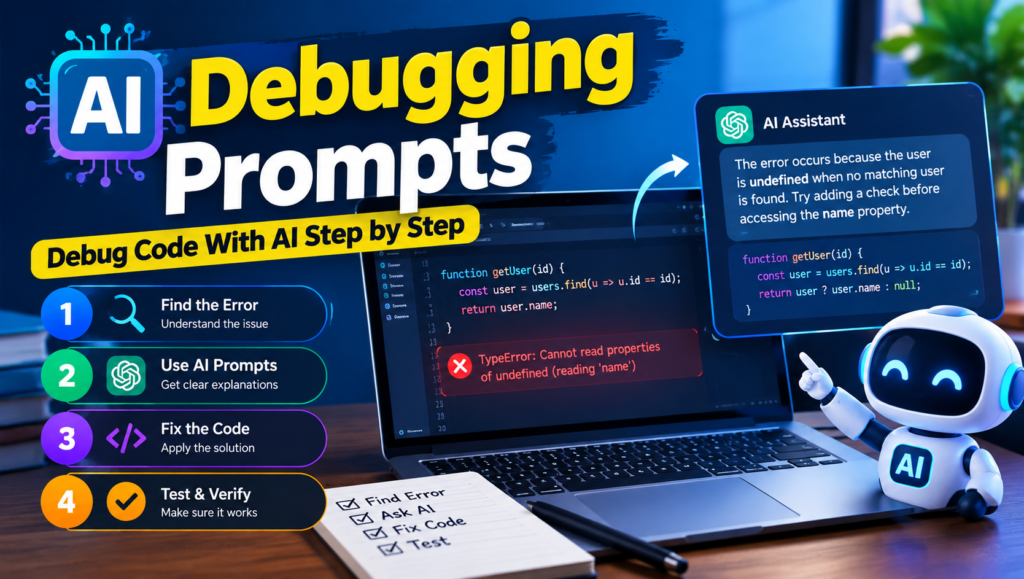
AI debugging prompts can save developers hours when dealing with errors, unexpected outputs, or broken code. By using clear AI coding prompts and coding assistant prompts, you can explain the problem, share the relevant code, and get targeted suggestions. AI debugging prompts with AI supports AI-assisted debugging, intelligent code analysis, and faster code troubleshooting without relying entirely on manual investigation.
Whether you’re a beginner or an experienced developer, effective developer prompts and programming prompts can improve your debugging workflow. AI developer tools, AI code fixer features, automated debugging, and AI debugging prompts can help identify bugs and suggest solutions, while prompt engineering for developers makes software development prompts more precise and useful.
Table of Contents
Error Analysis & Root Cause Detection
When a program fails, simply fixing the visible error is not always enough. Effective error message analysis and error diagnosis help developers understand what actually went wrong. AI can perform root cause analysis and root cause debugging by examining runtime errors, syntax errors, compilation errors, logic errors, and type errors. It can also analyze unexpected behavior, application crashes, exception handling, and stack trace analysis to help identify the root cause instead of treating only the symptoms.
A useful AI debugging prompts process starts by providing the error logs, warning messages, relevant code, and steps that triggered the problem. This gives the AI enough context to locate failure points, support bug detection, and guide the bug investigation. Ask the AI to reproduce the issue conceptually, explain the likely cause, and provide clear error reproduction and debugging steps. This approach makes it easier to trace complex problems and choose a reliable fix rather than applying random code changes.
Code Context & Debugging Information
AI debugging becomes much more accurate when you provide enough code context instead of sending only an error message. Start by mentioning the programming language, framework, runtime environment, dependencies, and version information. Include the relevant files, source code, function context, and caller function, along with configuration details and the project structure. This helps the AI understand the codebase context and repository context before suggesting a fix.
For complex issues, provide important environment details, the database involved, recent code changes, and the affected module. You can also share related tests and explain the application architecture so the AI can see how different components interact. The more relevant information you provide, the easier it is for an AI debugging assistant to connect the error with the surrounding code and recommend a solution that fits the actual project rather than giving a generic answer.

Debugging Process & Problem Solving
A strong debugging workflow starts with systematic debugging rather than immediately changing code and hoping the error disappears. Use step-by-step debugging as a structured diagnostic process: begin with code investigation, follow a clear debugging strategy, and try to isolate the problem before making changes. An AI debugging assistant can help you narrow down the issue, trace execution, and examine the execution flow, control flow, and data flow to understand where the problem begins.
During the investigation, ask the AI to identify failure points, inspect variables, analyze function calls, and trace dependencies between different parts of the application. It can also help you verify assumptions and compare expected behavior with actual results. Keeping a debugging checklist makes the process more consistent, while a practical troubleshooting methodology helps you solve complex bugs without making unnecessary changes throughout the codebase.
Code Review & AI-Assisted Analysis
AI code review can help developers examine code faster and catch problems that may be easy to overlook during a manual code inspection. With well-written code review prompts, you can ask an AI tool to perform code quality analysis, evaluate code readability and maintainability, check naming consistency and coding standards, and detect common anti-patterns and code smells. It can also identify logical flaws, missing validation, and potential bugs before they reach production.
For larger projects, AI can support a line-by-line review, pull request review, and PR analysis by organizing review findings according to their impact or severity ranking. You can also ask the AI to perform a requirements comparison and check whether the implementation meets the defined acceptance criteria. This makes AI-assisted analysis useful not only for finding bugs but also for improving overall code quality and making reviews more consistent.
Visit this: ChatGPT Prompts for Article Writing: 50+ AI Writing Prompts to Create Better Content
Refactoring & Safe Code Fixes
- Code refactoring: Restructure existing code to make it cleaner, easier to understand, and easier to maintain without changing its intended functionality.
- Behavior-preserving refactoring: Improve the internal structure while ensuring the original output and behavior remain unchanged.
- Safe code changes: Ask AI to recommend changes that address the bug without unnecessarily affecting unrelated parts of the application.
- Minimal code changes: Prefer a targeted fix over rewriting large sections of working code.
- Clean code: Use AI prompts to simplify code, remove duplication, and improve readability.
- Legacy code: Analyze older code carefully before modifying it, especially when dependencies or undocumented behavior are involved.
- Optimize logic: Ask AI to identify unnecessarily complex conditions, repeated operations, or inefficient logic while maintaining expected results.
- Preserve functionality: Explicitly instruct the AI to preserve existing behavior and avoid removing features during refactoring.
- Backward compatibility: Check that changes continue to work with existing APIs, integrations, dependencies, and supported versions.
- Refactoring strategy: Break larger improvements into small, testable changes instead of modifying everything at once.
- Technical debt: Use AI to identify outdated patterns and prioritize improvements that provide meaningful code maintainability benefits.
- Safe debugging fix: Ask the AI to explain why a proposed fix works and identify possible side effects before applying it.
- Regression prevention: Run existing tests and add relevant tests after a fix to confirm that the change has not introduced new problems.

AI Debugging Prompts Tools & Developer Workflow
| AI Debugging Prompts Tools / Features | How It Supports AI Debugging Prompts & Development | Best Use in Developer Workflow |
|---|---|---|
| ChatGPT for coding | Explains errors, analyzes source code, creates debugging prompts, and suggests fixes | Code troubleshooting, debugging, refactoring, and learning |
| Claude for coding | Handles large code contexts and helps investigate complex bugs | Repository analysis, code review, and detailed debugging |
| Gemini for coding | Assists with code generation, error analysis, and programming questions | General development and debugging tasks |
| GitHub Copilot | Provides contextual coding suggestions directly inside supported development environments | AI pair programming, code completion, and quick fixes |
| Codex | Supports coding tasks, code analysis, and software development workflows | Complex coding and automated development tasks |
| IDE assistants | Bring an AI coding assistant directly into the IDE for contextual help | IDE integration, debugging, code review, and refactoring |
| Terminal coding agents | Allow developers to use AI directly from the command line for coding and troubleshooting | Automated tasks, testing, and terminal-based development |
| Repository-aware AI | Uses broader project and repository context to provide more relevant suggestions | Large codebases and multi-file debugging |
| AI programming assistant | Helps explain code, identify bugs, generate solutions, and improve implementation | Everyday programming and developer productivity |
| AI developer workflow | Combines AI tools, prompts, testing, review, and iteration into one process | Building a consistent and efficient development workflow |
| Prompt templates | Provide structured instructions for common coding and debugging situations | Faster, repeatable AI interactions |
| Reusable AI debugging prompts | Save effective prompts for recurring errors and troubleshooting tasks | Consistent debugging across projects |
| Prompt library | Organizes useful developer prompts in one searchable collection | Managing and reusing successful prompts |
A practical workflow can combine AI pair programming, IDE integration, repository-aware AI, and reusable debugging prompts. Developers can maintain a prompt library containing tested prompt templates, then use an AI programming assistant during coding, testing, debugging, and code review. This approach can improve developer productivity while keeping AI assistance consistent throughout the development process.
Performance AI Debugging Prompts
Performance debugging is about finding why an application feels slow and fixing the underlying cause rather than simply changing code randomly. AI can help identify performance bottlenecks, slow code, and inefficient implementation patterns by examining algorithm optimization, time complexity, and space complexity. It can also review memory usage, CPU usage, inefficient loops, and redundant operations to determine which parts of the application are consuming unnecessary resources.
For applications that depend heavily on data, AI can assist with database performance by analyzing slow queries, excessive latency, and increased response time. Using profiling data makes AI-powered performance analysis more accurate because the model can focus on measurable problems instead of assumptions. Developers can also use AI to investigate performance regression, excessive resource consumption, and scalability issues, helping ensure that a fix improves current performance without creating problems as the application grows.
Visit this also: Best ChatGPT Prompts for Social Media Marketing & Content Creation
AI Debugging Prompts Structure
A strong AI debugging prompts should give the model enough information to understand the problem and produce a focused response. Start by defining the role you want the AI to take, then provide the context, technical context, and clear problem statement. Explain the task, project requirements, constraints, acceptance criteria, and expected outcome. You can also specify allowed changes, prohibited changes, and non-goals so the AI does not make unnecessary modifications.
For more reliable results, include testing requirements, verification instructions, and any important assumptions. Finally, define the output format or desired response format, such as a diagnosis followed by a proposed fix and testing steps. Using a focused prompt or structured prompt makes AI debugging prompts requests easier to understand, while a reusable prompt template lets developers apply the same effective structure to different coding problems.

AI Debugging Prompts Verification & Validation
Fixing a bug is only half the job; you also need to prove that the solution works. Start by asking the AI to compile the code, run tests, and run unit tests that cover the changed functionality. Where applicable, run integration tests and run regression tests to ensure the fix does not break existing features. Additional checks such as type checking, linting, static analysis, security scanning, and dependency scanning can uncover problems that normal tests may miss.
After making changes, perform build verification and review the test results carefully. Use the recommended validation commands, inspect the diff, and verify the fix against the original error. You should also confirm expected behavior and verify edge cases before considering the change ready. For production readiness, combine evidence-based verification with human code review so that both automated checks and developer judgment support the final decision.
Frequently Asked Questions About AI debugging prompts
What are AI debugging prompts?
AI debugging prompts are specific instructions given to AI coding tools to identify errors, analyze code, find root causes, and suggest effective solutions. They help developers get more accurate debugging assistance.
How can AI prompts help with debugging code?
AI prompts can help analyze error messages, stack traces, source code, and unexpected behavior. A detailed prompt gives the AI better context, allowing it to identify potential bugs and recommend step-by-step fixes.
What should I include in an AI debugging prompt?
A good AI debugging prompt should include the programming language, relevant code, error message, expected behavior, actual behavior, environment details, recent changes, and testing requirements. Clear constraints can also prevent unnecessary code modifications.
Can ChatGPT be used for debugging code?
Yes, ChatGPT can assist with debugging by explaining errors, analyzing code, identifying possible root causes, suggesting fixes, and creating testing steps. Developers should verify AI-generated solutions before applying them to production code.
How do I write effective AI debugging prompts?
To write effective AI debugging prompts, clearly define the problem, provide relevant technical context, specify the desired task and output format, and explain any allowed or prohibited changes. Asking the AI to explain its reasoning, propose a targeted fix, and suggest verification steps can produce more useful results.

